Showing posts with label k-12. Show all posts

Friday, November 15, 2013

Spark, Whimsy -- Learning simply to Learn

Space Models at Brick Fest, Flickr via Creative Commons
Young children are encouraged to be whimsical and imaginative and to always ask why. Students in younger grades look with awe upon the lifecycle of a butterfly and draw endless pictures of colorful circles that they truly believe resemble their parents.
Then a few years pass. Times tables are memorized and we increase the content we teach and begin to instill a sense of conformity and pressure in our students that focuses on attaining success measured by society. It is no surprise that the imagination of our students changes to reflect a stale, stagnant state because they are learning what others want them to learn. Yet, our students are still creative underneath a shell of academic standards. However, we don't give them the opportunities to show the whimsical, inquisitive nature deep within them.

As teachers, we suffer from much the same ill-fated trajectory our students do. Believing we can change the world as a young teacher, we come to the first year of our teaching careers with an energy that feeds into our innovative lessons. Years pass and we are met with more strict standards, more programs to teach, less time to teach them, and more students, many of whom are bored and unengaged with the curriculum since they are being told what to learn and how to learn it.

Think of topics that you find interesting. Think of what you'd want to learn in school. Now think of what you teach. Think of how you teach it. Ask yourself, would I want to learn that way? Would I want to spend my afternoons at home doing that? A recent article came out about a revolutionary way of learning that focuses on engaging students with what they are interested in. Joshua Davis writes for Wired, "How a radical new teaching method could unleash a generation of geniuses." In it he explores a variety of progressive philosophies on learning.

Peter Gray, research professor at Boston college, is quoted by Joshua Davis as stating, " 'We’re teaching the child that his questions don’t matter, that what matters are the questions of the curriculum. That’s just not the way natural selection designed us to learn. It designed us to solve problems and figure things out that are part of our real lives, ' " which raises some key issues of institutionalized schooling. The whole purpose of school should be to teach kids a love of learning, a desire to understand the unknown, and the ability to apply what they know to questions they have. Ultimately its about the spark that fires up their curiosity thus raising their engagement in the classroom. It should not be about what other people think they need to know.

So, what if homework was filled with activities that truly sparked the curiosity of our children, thus supporting that their questions matter. What if students rushed to school the next day asking why, why, why? What if students eagerly awaited the next lesson rather than day dreaming through it?

A simple task like watching a video about space could be that spark for a child. A spark that could change the trajectory of a student's life, assisting them in realizing dreams they have. Take a look at these amazing videos on the International Space Station by Canadian astronaut Chris Hadfield.

Here are two class work or homework documents I’ve put together, one for primary grades and one for upper grades.

Take on the challenge of giving assignments that you’d want to spend time on. If you wouldn’t want to do it, why would your kids?
Inspired and want more? Additional resources can be found at Ramsey Musallam’s Cycles of Learning blog that discusses in depth the use of video as a curiosity spark for initializing a love for learning.

Friday, November 1, 2013

The handwriting dilemma

http://www.flickr.com/photos/eethompson/2143724448/sizes/z/in/photolist-4gr9Am-4gr9Y3-4gs649-4gs68d-4gziVf-4qc5EB-4C7kQe-4Crr1f-4HAhxX-4Jrx5R-4Jrxa6-4JvL3o-4QhtyV-4Qpa9k-4SDoRa-57DUxE-5cz5PN-5eRFEU-5hUDRR-5kDyD9-5weuAr-5zbkKW-5EGj3c-5HvZoM-5HAjrQ-5HAkj3-5TCFZY-61nQq5-68oPVo-6nobb5-6K7SWF-6K7TqH-6KbeKG-6KxXj4-6LoTe8-73JFK4-776vPa-77arAs-7u6vxg-7uapM9-8a2fw8-b9Fppr-bpUTSM-8rVDfK-7Tnjp9-8qyy7j-fVqVCP-fb8wgd-aUiJcr-d8NhyJ-9jb1Wh/
The cycle of typing and tapping on the phone, keyboard, etc. As I settle into bed, I realize I haven't "written" anything with a pen and paper, all day. My gut races from excitement to terror as I realize there is simply no need to put pen to paper.

With the rapid increase of communication through digital devices, does it matter if we write or not? Is the future of a penned signature a fingerprint?


Common Core has removed the mandatory teaching of cursive.  A few articles highlight the importance of teaching cursive in school, In Defense of Cursive and Should Schools Still Teach Cursive. Yet, hardly anyone uses cursive as a primary form of writing. The opposite argument can be raised. If no one uses cursive anymore, then we shouldn’t teach it (clearly that is why CCSS removed it). So, with the disbandment of third graders’ write of passage, the future of penmanship as a whole appears to be misty and murky.

If writing with a pen is no longer typical, then do we even need to teach it in schools? Rather than writing in kindergarten, should kids just learn to type? Can we even extend that to touch typing on a screen rather than keyboarding?


Historically, penmanship was an art. From the Constitution, to love letters, penmanship was and still is a way to physically connect with a person by knowing that his or her hand penned the words.


Email has rapidly replaced telegrams and letters. E-cards are the new birthday notes.


The word write means to mark (letters, words, or other symbols) on a surface, typically paper, with a pen, pencil, or similar implement. Lets think about that word, “typically”, and understand that we are at a crossroads of typical and mainstream. If write means to mark, then as we type we mark the computer screen and as we write with a pen we mark paper. Yes, typically we write on paper, but in mainstream we mark on the computer. So the work write really should now include the mainstream devices we use to write which are computers.


And on the subject of writing, why do we still teach a “friendly letter” format when adults hardly send handwritten letters anymore? What we should be emphasizing is how to craft simplistic email subject lines, digital signatures, and text messages.


Communication has dramatically shifted from physical to digital. I don’t even know what ringtone is on my phone because my primary way of communicating is via text. Phone messages go forgotten because I don’t know anyone who actually leaves me messages, so when someone does I don’t even remember to check them.


Writing in school needs to keep up with the culture of communication. If we are preparing students for life, then we need to think about how they will be communicating in the world when they are adults, and thus we need to teach foundational skills that will help them in that arena.


Yet, on the flip side, there is deep historical and personal value to the physical connection between hand, pen, and paper. Productivity expert David Allen states in the New York Times article by Phyllis Korkki In Defense of Paper, “ Its physical presence can be a goad to completing tasks, whereas computer files can easily be hidden and thus forgotten, he said. Some of his clients are returning to paper planners for this very reason, he added.”
Beautifully stated, co-founder of Levenger, Steve Leveen expresses to the New York Times, “ ‘Paper reminds us that ‘we’re physical beings, despite having to contend with an increasingly virtual world,’ he said. People complain that writing by hand is slow, but that can be good for thinking and creating, he said: ‘It slows us down to think and to contemplate and to revise and recast,’ " (In Defense of Paper by Phyllis Korkki, New York Times).
The crossroads are here. Handwriting is real and physical, ideas spring to life with effort. Typing is quick, efficient, and productive. We accomplish more with less, and neatness is automatic. Handwriting connects us to the historical past, and typing pushes us forward.
Kids will rely upon texting more than email in the future. Maybe the business deals they make will be artfully crafted with emojis and Vines.
Where does handwriting stand? Where does communication stand? And how do we teach our students and children to expertly use the communication tools available to them if we ourselves stick to the tools we know?

Tuesday, October 15, 2013

Privacy settings for student blogging

When working with students on a digital platform, it is necessary to be very aware of privacy and compliance with school acceptable use policies, media releases, and COPPA. 

As a tech coach, I am constantly on the look out for ways to redefine teaching by integrating technology. I poke my nose into the layers of privacy policies, security, and COPPA on a daily basis. To my dismay, I realize that there are often too many cracks in website security for me to even be able to recommend an awesome site to teachers. Digital security is a huge issue, take a look at the blog post on Silicone Angle explaining how Yahoo on is finally focusing on security.

So, I am happy to be able to give a step-by-step breakdown of how to maximize the customizable features of Blogger's privacy settings so that both students and parents feel secure when their students are blogging for an authentic audience. Side now, curious about how to set up Blogger as a teacher, or for you students, or even how to use it? Check out our professional development website page about Blogging in the classroom and stay tuned for more posts about how to capitalize on a blogging platform and get students writing.


Tutorial below on how to set up a very private blog for your students.

1. Settings (all privacy information lives here)
2. Settings, Basic, Privacy, Edit. Here are the basic level Privacy Settings
2a)Change both settings to No


3. Settings, Basic, Permissions


3a) Choose your reader level preference:
***Public: anyone can read if they have the link
***Private: only those who are authors can read (not recommended)
***Private: only those who you add as readers can read (recommended). For example, if each student has a blog, each child can add his or her classmates, teacher, and his or her parents to his or her reader list. This way, parents can only view their own child’s blog.


4. Settings, Click Posts and Comments. See here for more information on moderating comments.
5. Post specific settings:

When you create a post you have other privacy options as well. Click New Post to start writing a post and then options on the right hand side, sidebar.

Monday, October 14, 2013

The iPhone affect, how can we create captivating professional development?

The "iPhone" affect. 

As a district technology coach, my job is to show teachers amazing ways to use technology that allows them to be more efficient and to redefine how they teach.

I want to start viewing my job more like a business rather than like a school. I offer classes to teachers twice a week on a variety of educational topics, but do not have many teachers attending. Why?

I need to market this professional development more effectively so that teachers want to come. My job is to "sell" professional development to teachers, who might not even realize they need it. My job is to market the classes to teachers so they want to give their time after school. My job is to focus on my users' needs, not only on what I want the product to look like.

Our passion for our "product" or rather "professional development" should be evident to all and should spread to others in captivating ways, causing them to pause, rethink what they do, and realize they want something they didn’t realize they wanted before, but are now willing to "pay" anything for it. Teachers' payment is their time.

The iPhone affect, you didn't know you couldn't live without one until you realized how much is changed your life.

Professional development needs to be like that. It shouldn't be a chore to learn, but rather it should totally alter the way in which we teach and how we support our students in their learning.

We want teachers to readily and eagerly giving their time to us in order to learn.

How do you offer captivating professional development in your school? 


Tuesday, October 8, 2013

Friend Request for JFK

What would historical figures post to Facebook, Twitter or Instagram? In light of connected educator month, try to infuse your curriculum with a social media flavor.

As Mark Zuckerberg states, "By giving people the power to share, we're making the world more transparent."


Strive to create a transparency within the historical context framework. Having students create social media "accounts" or "profiles" for historical figures allows them to work on the following skills:
  • Compare and contrast sharing of information from a historical and a current perspective
  • Analyze what information is necessary to share with a public audience
  • Discuss privacy from a historical and current perspective
  • Analyze whether or not the transparency of the internet is beneficial
  • Write about how the historical figure's life would differ if he or she were to post to Facebook, Instagram or Twitter
  • Compare the use of radio to the use of social media in politics
  • Create analogies of current social media tools to their historic counterparts (think blogs to newspapers)
Imagine the possibilities of leveraging the trend in social media to engage students with the ways in which we share personal information. A million conversations around privacy could surface really allowing you to teach students digital citizenship skills.

Check out a few templates below (thank you remixing culture of the present and the future):

  • Instagram template PDF and Jpegs. Print and draw photos or simply add your own photo over the top. 


Wednesday, February 6, 2013

Minecraft in Schools--take the risk or not? What do you think?

image


Source: http://images.eurogamer.net/2012/articles//a/1/4/8/2/5/3/2/Minecraft_360_049.png


Recently I attended a conference in Hong Kong and a session on using Minecraft in school stood out to me in and edgy, risky way. As a teacher eager to learn new technologies and to think about how to incorporate them effectively into my teaching, the idea of using a game that my students LOVE intrigued me. Rob Newberry was a dynamic speaker, discussing the intense creativity necessary to both create and to survive in Minecraft worlds. I’ve looked at a variety of articles discussing the pros and the cons of video games as well as investigated a few TED talks on the topic of gaming as well. Previously I was very against video games, thinking that they sucked people into a digital world that then negatively impacted their interpersonal skills. However, having done some research, I do think that creation games like Minecraft require a set of skills that can be incredibly valuable in an adaptive world. That being said, I do not think that people should spend a great number of hours on games, but I do think that using an interactive platform like Minecraft has potential to redefine the way that we teach certain subjects. For example, using Minecraft to teach about culture and community could be an innovative way for students to explore what is essential to life and to living with others. I am eager to think through and to understand the place that Minecraft could have in school. Some questions I have about integrating it would be: 1) understanding from parents that the game could be useful as a tool to teach content 2) what if kids don’t like or want to understand the game, how would this impact integrating it? 3) would it be better to simply have a club after school?

My questions and thoughts continue to pour out of me in regards to this controversial topic. Any opinions or advice would be greatly appreciated. I will be beginning to assist with a Minecraft club soon that is focused on creating a world and a culture. Students will then compare these two worlds analyzing why the are similar and different. Here’s to new adventures, new horizons, and lots of time spent watching YouTube tutorials.

Saturday, February 2, 2013


Check out one of my students’ author podcast interviews. Students used Garage band to create an interview with their favorite author. The project was a great success. Check out the podcast lesson assignment here. 

Wednesday, January 30, 2013

Using ibooks with English learners=brilliant!


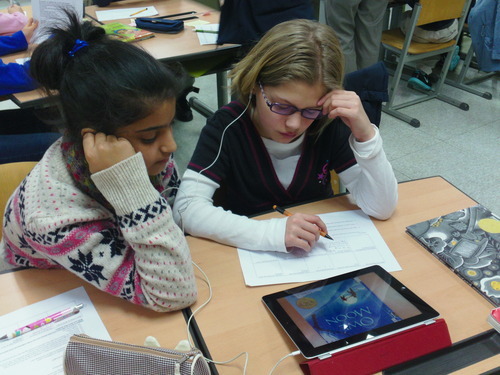
Students listening to a poetry reading of “Owl Moon” on the iPad using VoiceThread. Other applications of VoiceThread: poems read and thought of rather than written, digital versions of narratives, interviews etc., quick and easy way to do a podcast. 


When January roles around, many of us find ourselves with bright new faces in our classroom, wide-eyed and a bit nervous. New students starting mid year, are to me, both the most wonderful occurrence and the most difficult. 


Catching up a student on the ins and outs of your classroom, technologies he or she might not know, as well as assessing their learning levels so that they can be placed in the appropriate reading and word study groups are all necessary, but time consuming. 


My new student is full of the most inquisitive questions and desire to understand. That being said, this wonderful student is still behind many of the other kids in my class. Therefore, I’ve needed to sit with her as we work through math, reading and writing in order to allow her the necessary explanations that will enable her to participate. 


That being said, my other students are limited in the time I can give them. So, today I tested out using my ipad as a second “teacher”. I thought of this idea while she and I were reading, then proceeded to spend 15 minutes figuring out how to find an age appropriate website or PDF that I could then convert to an ebook through a site I had googled moments before. 


By the length of that sentence, my brain and fingers were trying to move at about 100 miles per hour. So, finally we reached our destination. I changed the general settings on my iPad to allow for accessibility (ie. so that the iPad will read to you when you highlight something). Then, I showed her how to highlight sections so the iPad would read it to her as she read along. We then worked on going back and highlighting the words she still didn’t understand. 


This was helpful as I was then able to walk to other reading groups and listen in on their discussion or chime in with additional questions. 


My next phase of implementation is to 1) be ready with the PDF prior to handing over the iPad 2) look into installing an epub plug-in on my browser (testing out Chrome plug-in here) 3) figure out how to enable highlighting words and researching their definitions 4) asking myself how can I take this to another level with her? (As of now I am thinking of having her voice record a summary using voicethread.) 

Tuesday, December 11, 2012

The age old debate over homework

Recently I stumbled upon an article from the New Yorker called Louis Menand: The End of Homework. As a teacher, the philosophical battle over assigning homework versus not is continuously pumping through my veins. Most of us know the obvious however that worksheets and filler homework is a waste of everyone’s time. I agree with that for sure and I also agree that kids need to be kids and therefore have time to play and to relax. 


That being said, I don’t know if abolishing all homework is the right answer either. In my opinion, the work that I assign students is purposeful and is used to review concepts or give them individual time to write without their classmates in the same room. Three items that I find valuable as homework are reading, math, and 20 minutes of writing. While I will raise my hand and admit guilt, that I do assign more homework than those three items, this article made me think twice about that avenue. 


Each night I get an email saying a student forgot this at school or his or her computer would not work to do their blog post. If students had an hour in class to complete their work, then these questions would not arise. That said, with so much material to cover as a teacher, some times it seems impossible to give students that luxury.


But, would it be the worst thing to get through less in order to give students a break at home? Teaching is South Korea, I see first hand the stress that my 10 to 11 year olds are under due to the pressure from home and society. To allow students to take a break (not overload them with work), would be ideal. 


Heading to break, I think that I will come back and try out sticking to my word about only have students practice math, reading and writing at home for a limited amount of time. Looking forward to posting about my success and failures in thinking through my own philosophy on homework. 

Sunday, December 2, 2012

Group work evaluations


It is always hard as teachers, for us to judge how well our students work in groups. As we meet with various teams, inevitably we miss what occurs in the others. So, rather than evaluate the groups myself, for our novel studies, I asked my students to work together to evaluate each other. 


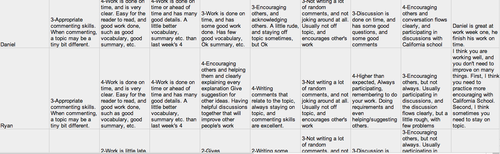
Last week, students filled out an online Google Form where they self evaluated as well as evaluated their group members. Then I took the data and created an excel sheet with the names of the students and their evaluations next to them (see below). 


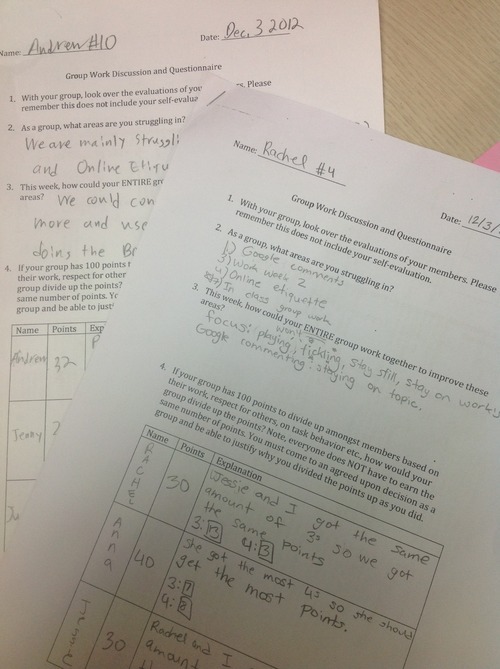
Students were then given a handout with the following questions: 


  •   With your group, look over the evaluations of your members. Please remember this does not include your self-evaluation.

  •  As a group, what areas are you struggling in?

  • This week, how could your ENTIRE group work together to improve these areas?

  •  If your group has 100 points to divide up amongst members based on their work, respect for others, on task behavior etc., how would your group divide up the points? Note, everyone does NOT have to earn the same number of points. You must come to an agreed upon decision as a group and be able to justify why you divided the points up as you did.

  • As an individual, what areas do your group members wish you could improve in?

  • This week, how could you individually improve in those areas?

In their group, they worked together to answer the above questions. Listening to the conversations of the students I noticed the following both positive and negative: 


  • Dividing up the points between group members was difficult and a bit confusing at first

  • Some groups chose to use math to figure out how to divide up the points

  • Students conversed heavily and had some difficulty in being open to say that 

  • Explaining what to actually do was tough as students need more time to work on understanding how to give specific ways to improve

Monday, October 29, 2012


Check out some amazing How to … videos from my 5th grade class. We used imovie, creative commons, and cameras to make short videos teaching someone something new. Our class plans to enter them in a great contest through Next Vista for learning. Scan the QR code or use this link to get to our class You Tube channel where you’ll find other great videos to learn from. 

Sunday, October 28, 2012

Presentation at KORCOS on essay correction

Link: Presentation at KORCOS on essay correction

This past Friday I presented at KORCOS, a conference near Seoul for international schools. Here are my slides that explain the use of using screencasting with essay correction to enhance student engagement. 

UA-44643247-1